Field guide
Bug reports that get fixed the first time
Every bug report is a request for somebody else's time.
The person reading it wasn't there. They didn't see your screen, they don't know what you clicked, and they have eleven other tickets. So the first thing they do with a vague report is send it back: "Can you tell me exactly what you did?"
Round two. Then round three, because your answer raised a new question.
I spent twenty years in finance and ops on the sending side of that thread. Now I'm on the receiving side. Snippy Snip's release notes credit the reports that shaped it, and the pattern is the same one I saw from the other chair: the reports that get fixed fast are the ones that cost nothing to believe.
That's the whole game. A good bug report removes every reason to ask a question back.
Even the maker sends bad ones. This morning, 2026-09-10, I shipped a build of Snippy Snip, tried to update my own copy, and reported: "I got the prompt when I tried to update but for some reason it didn't pop up." No expected, no actual, no steps. It still took a diagnosis, and the cause was the app's own ⌘Q guard, the one that closes a window instead of quitting, silently canceling the updater's relaunch. Build 40 went out at 10:44. At 12:11 I sent another: "It launched behind the editor when I clicked on it." Build 41 went out at 12:17. Two builds in one day, each prompted by a report that reads like a text message. I know the rule. I still typed the adjectives.
The four things every fixable report contains
Strip the ticket templates down and there are four:
- What you expected to happen.
- What actually happened.
- How to make it happen again, click by click.
- Where it happened: app and version, macOS version, browser if it matters.
Number four is text. Type it once, keep it in a snippet, paste it every time.
Numbers one through three are the part people struggle to write, and the reason is simple: prose is a bad format for describing a screen. You end up with "the little gear icon near the top, not the one on the left, the other one," and the reader still opens the wrong menu.
Don't describe the screen. Show it.
A screenshot proves a state. A recording proves a sequence.
This is the only decision you have to make, and it decides the whole report.
If the bug is a thing that is wrong right now, a screenshot is the report. A total that doesn't foot. An error dialog. A date field showing last month. A button grayed out when it shouldn't be. The evidence is sitting on screen; capture it, point at it, done.
If the bug is a thing that goes wrong when you do something, a screenshot can't carry it. "I click Save and the row disappears" has three frames in it: before, the click, after. A single image shows one of them and the reader has to imagine the other two. That's where round two comes from.
Record those. Thirty seconds of screen, from the state before the click to the state after, and the developer watches the bug happen instead of reconstructing it from your adjectives.
The rule in one line: state gets a screenshot, sequence gets a recording. If you can't tell which yours is, it's a sequence.
The screenshot report, done properly
Capture the screen where the bug is visible, then spend sixty seconds in the editor before you send it. Four marks, in order.
One arrow at the bug. One. The reader's eye goes there first and stays there.
A box around the context. The panel, the row, the tab the bug lives in. It answers "where in the app" without a sentence.
Numbered badges on what you clicked to get here. 1 on the menu, 2 on the item, 3 on the button. This is the reproduce-steps field, drawn instead of typed, and it's the single mark that saves the most round trips.
One line of text. Expected versus actual, in the shot itself: "Expected $12,480.00. Shows $1,248.00." Now the image stands on its own when it gets forwarded without the email it came in.
Then look once for anything that shouldn't leave your machine. Customer names, account numbers, your other browser tabs. Blur them before the shot goes. On this one I'm not flexible: a bug report gets pasted into ticket systems, Slack channels, and vendor inboxes, and you don't control any of them.
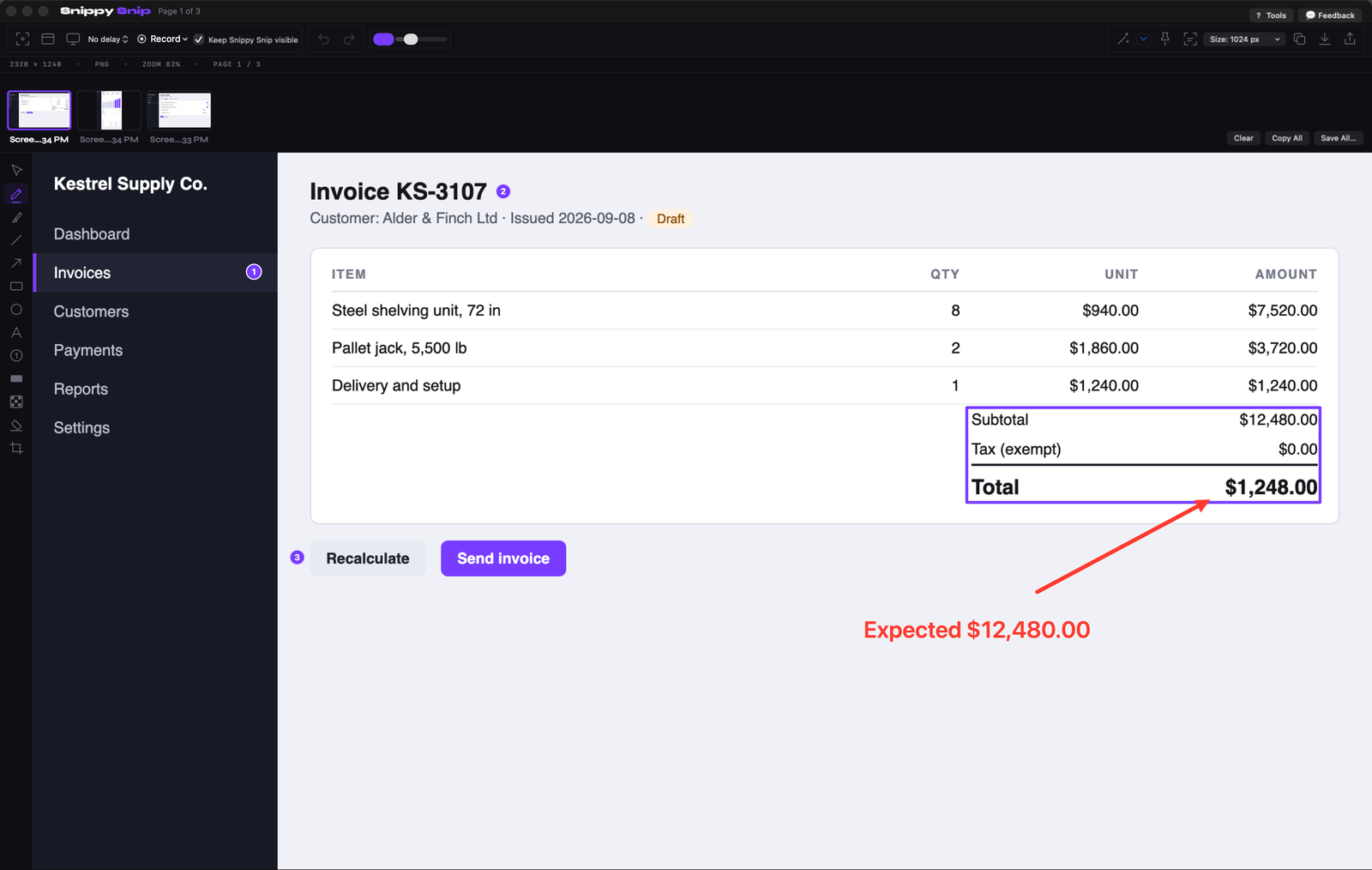
The screenshot report: one red arrow at the wrong total, a box around the totals panel, badges 1 to 3 on the path that got there, and the expected figure written on the image. Every number invented.
The recording report, done properly
Recording a bug is not making a video. Nobody needs a title card. Here's the discipline that keeps it useful.
Start from a clean state. Get to the screen right before the bug, then start recording. The developer doesn't need to watch you log in.
Keep it under a minute. If the bug takes longer than that to reproduce, that's a finding in itself; say so in the ticket and record only the last stretch.
Show your clicks. A recording where the pointer wanders and things happen is a mystery. Turn on click highlighting so every click is marked in the video. Now the developer sees "clicked Save, row vanished" rather than "something occurred."
State what you expected, out loud or in the ticket. If you narrate, one sentence at the moment it goes wrong: "That should have saved." If you'd rather not talk, put the sentence in the ticket. Either way the expectation has to be written down somewhere, because the developer may not know that your expectation is the correct one.
Watch it before you send it. Once. Most bad bug recordings are bad because nobody watched them: the bug happened off-frame, a notification covered the dialog, the microphone was muted. Thirty seconds of review saves a full round trip.
Send a format they can open in the ticket. For a short silent take, a GIF plays inline in most ticket systems and chat tools with no download. For anything with sound, or longer than about twenty seconds, send the video file.
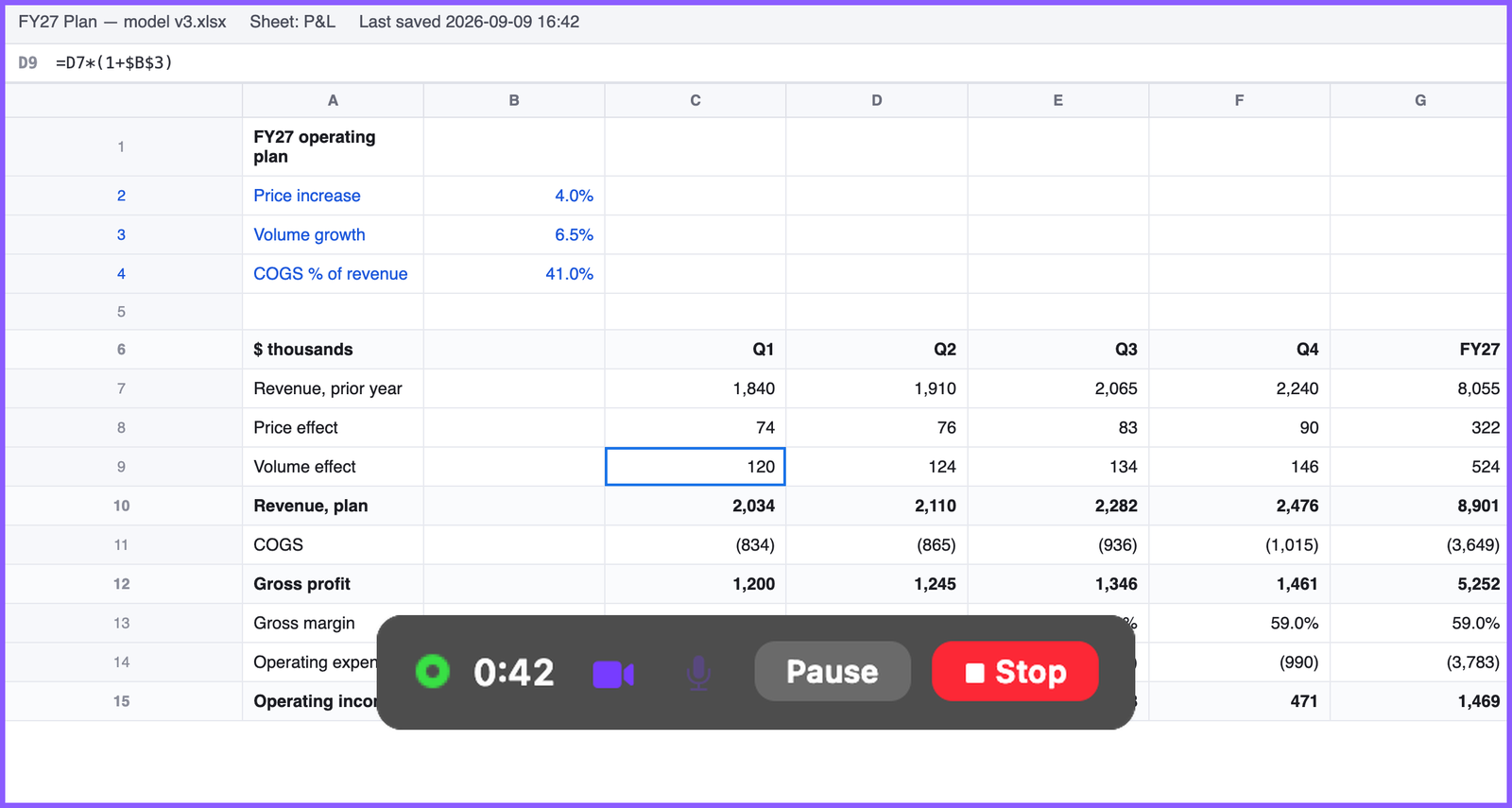
Recording a sequence instead: the bar keeps the clock, pause and stop in reach while you reproduce the bug. Every number invented.
What your Mac already does
Press ⌘⇧5 and you get a capture bar with record buttons for the whole screen, a window, or a portion, plus a microphone setting and Show Mouse Clicks under the Options menu. That will record a bug. It's free and it's already installed.
Where it stops is after you press stop. The file lands on your desktop, and everything else is on you: opening it to check the take, going again if you rambled, turning it into a GIF for the ticket, pulling a frame out to draw an arrow on it. Each of those is a trip to another app. None of them is hard. All of them together are why people send the screenshot instead of the recording, and then spend three rounds explaining what the screenshot doesn't show.
I wrote a full guide to the built-in shortcuts separately. If your bug is a state, ⌃⌘⇧4 and Markup will get you most of the way.
The template
Paste this into the ticket, fill in the blanks, attach the image or the recording. It's boring on purpose. Boring gets fixed.
Expected: one sentence.
Actual: one sentence.
Steps: see the numbered badges in the screenshot, or "see recording, 0:00 to 0:40."
Environment: app and version, macOS version, browser if relevant.
Attached: screenshot or recording.
The steps line points at the image. The image carries the steps. You wrote each thing exactly once.
So, the next bug you hit: before you type a word, ask whether it's a state or a sequence. Capture that. Then read your report as the developer and look for the question they'd send back. If you can't find one, you're done in one round.
The tool I use
I built Snippy Snip after 22 years on Windows left me looking for a Snipping Tool on my Mac, and bug reports are the job it gets used for most.
Free: every capture mode, the annotation editor (arrows, boxes, text, numbered badges that renumber themselves when you delete one), blur and redact, and the shot on your clipboard the instant you take it, kept in sync as you mark it up. No watermark, no nag.
Pro, $19 once: screen recording with click highlighting and your microphone, pause and resume, and the part this article is really about: the take plays back in the editor the moment you stop, so you watch it before you keep it. Save it as video, save it as a GIF sized for email, annotate a single frame, or throw it away and go again. No subscription, every update included.
Free forever, no watermark. Pro is $19, once.
Twenty years in finance and operations, exited founder, still closing the books monthly across his own businesses. Built Snippy Snip after 22 years on Windows. LinkedIn