Field guide
Screenshots Are a Finance Skill
Early in my career, I found a $500,000 overbilling by putting two numbers next to each other.
The contract said 7.5 percent. The invoices were coming in at 9 to 10.
That's the entire finding. Two numbers, side by side, that were supposed to match and didn't. No advanced modeling. No fancy analysis. Just a reconciliation — and a picture of the mismatch that nobody could argue with.
I've spent twenty years in and around finance since, and that moment turned into a conviction: most of finance work is context transfer. You know something about the numbers that someone else needs to know. Your CFO. Your auditor. The AP clerk. The vendor who's overbilling you. The analysis is the cheap part. Getting what's in your head into theirs, intact, is the job.
And prose is a terrible medium for it.
A paragraph describing a spreadsheet forces the reader to rebuild your work in their imagination. A screenshot hands it over finished.
The work already lives on a screen. Show the screen.
Here are the four habits that do it. I still close the books every month across multiple businesses, and I use all four weekly.
1. Capture the model before you touch it
Before you restructure a formula chain, re-map the P&L, or rebuild a schedule, take a screenshot of the working state.
It costs two seconds and it buys you two things.
Insurance. Halfway through the rebuild you will want to know what the old version said. Not the logic. The output. What was Q3 gross margin before I touched anything? The screenshot knows. Your undo history doesn't, not after forty edits.
Memory. This isn't version control. It's cheaper than version control. It's the "before" photo. When the new model produces a different number than the old one, the first question is always did I change the answer or did I break something? The before-shot is how you tell.
The upgrade on this habit: pin the "before" screenshot so it floats above the spreadsheet while you rebuild. Old state on top, new state underneath, eyes on both. No window juggling.
2. Annotate the break for the person who has to fix it
Here's a sentence I've read a hundred versions of:
"The GL balance doesn't agree to the subledger, I think it's related to the September accrual but it might also be the intercompany entry, can you take a look?"
That email transfers a task. It doesn't transfer context. The person on the other end now has to find both numbers, reconstruct your investigation, and hope they land where you did.
Now the same break as a screenshot: both balances visible, an arrow on each, one callout. These two should tie; they're off by $41,283. If you've already walked partway down the path, step balloons mark the trail: A, check the accrual. B, check intercompany. C, here's where I stopped.
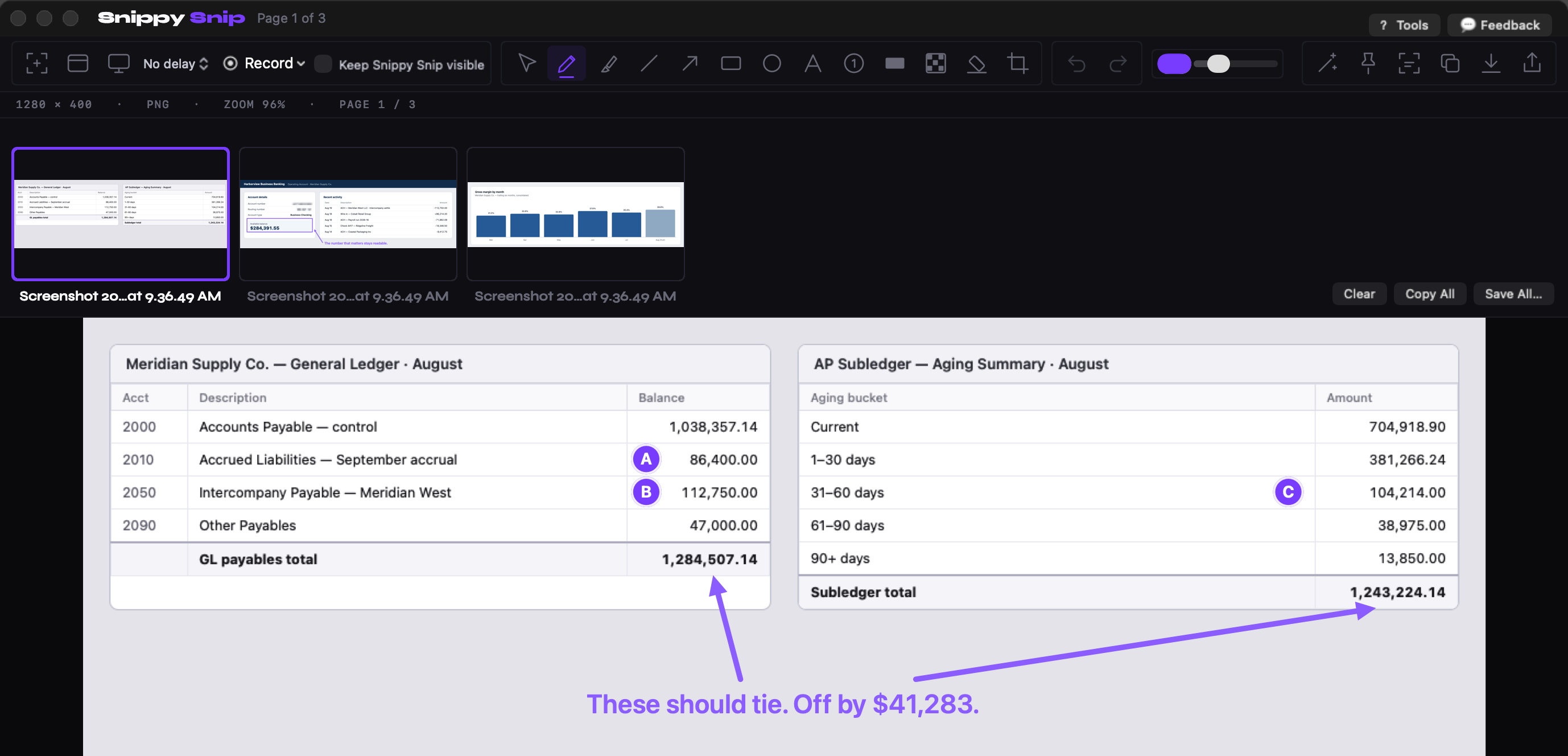
The whole email, as one image: marked up in the Snippy Snip editor, with the session's other captures collecting in the filmstrip. Every number invented.
Prose makes the reader redo your work. Annotation hands them your work.
That $500K finding? What made it move wasn't the analysis. It was that anyone who looked at the two numbers side by side saw it in five seconds. A break nobody else can see is a break nobody fixes.
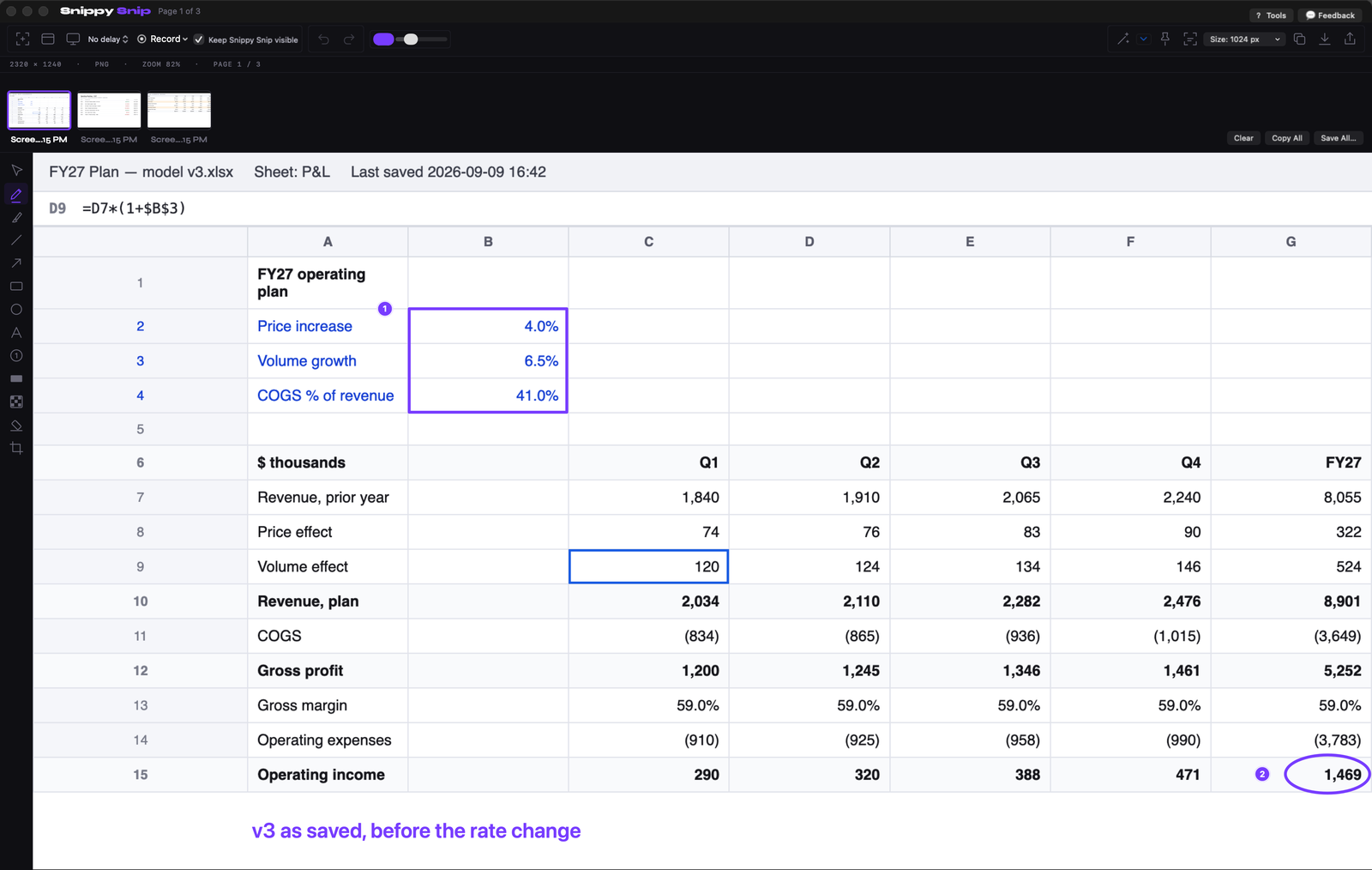
The before photo: the model as it stood, inputs boxed, the output circled, filed in the session carousel next to the other captures from the same close. Every number invented.
3. Record the close instead of writing the runbook
Every finance team has a close process, and in most of them the real process lives in one person's head. The runbook, if it exists, was written eighteen months ago, and the process has drifted since. Runbooks go stale the day you write them, because writing documentation is a separate job from doing the work, and the separate job always loses.
So stop writing it. Record it.
Next close, the person who runs it hits record and narrates while they work. Every click. Every report they pull. Every judgment call: this warning always fires, ignore it; this number should be within a hundred bucks of last month or something's wrong. That last category is the gold, and it has never once made it into a written runbook, because nobody thinks of it as knowledge. It's just what they do.
The close was happening anyway. The recording costs nothing extra. And now your continuity plan isn't "hope she never takes a vacation in month-end week."
A runbook describes the process. A recording is the process.
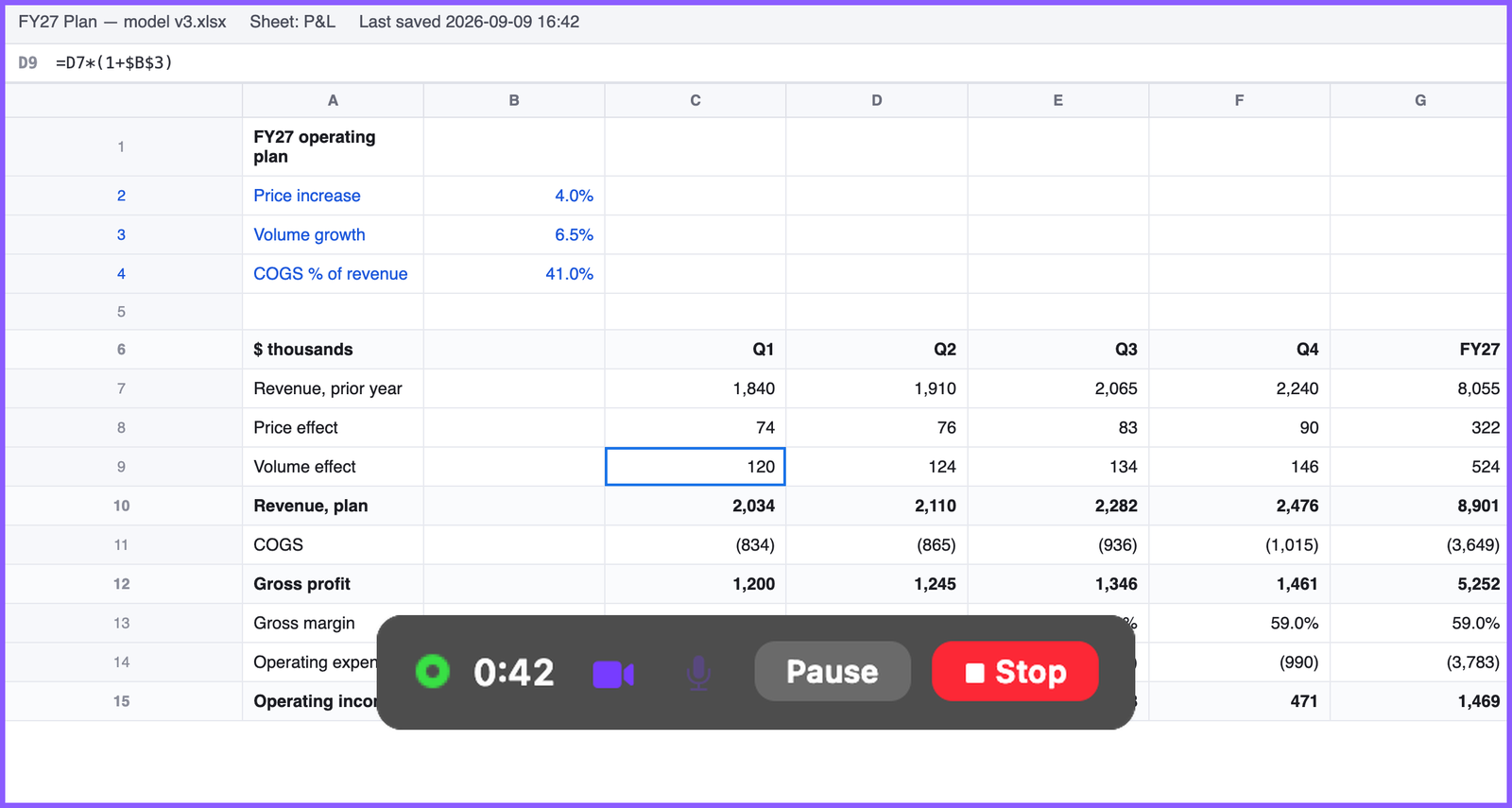
Recording the close: the bar keeps the clock, pause and stop in reach while the work happens. Every number invented.
4. Blur it before it leaves your machine
Finance screenshots are radioactive by default: account numbers, routing numbers, wire instructions, employee comp, customer names.
The habit is when, not whether. Blur at capture time, before the image touches Slack, email, or a ticket. "I'll crop it later" fails, because later the screenshot is already sitting in a channel with forty people in it. Once it leaves your machine, you don't control it anymore.
One pass with a blur tool, every time, and the question of who saw the account number never comes up. In finance, boring is the goal.
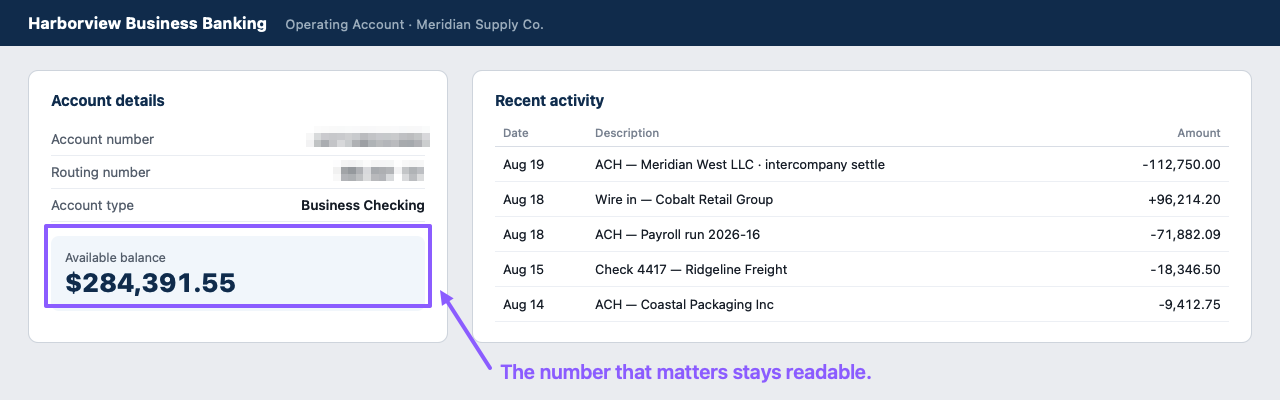
Blur the radioactive parts, keep the point. Annotated with Snippy Snip; every number invented.
One more, because retyping numbers is beneath you
If you're keying figures off a bank portal or a locked PDF into a spreadsheet by hand, stop. Text extraction pulls the numbers straight out of the image. And for the dashboard that scrolls three screens deep, a full-page capture grabs the whole thing, not just the viewport you happened to be looking at.
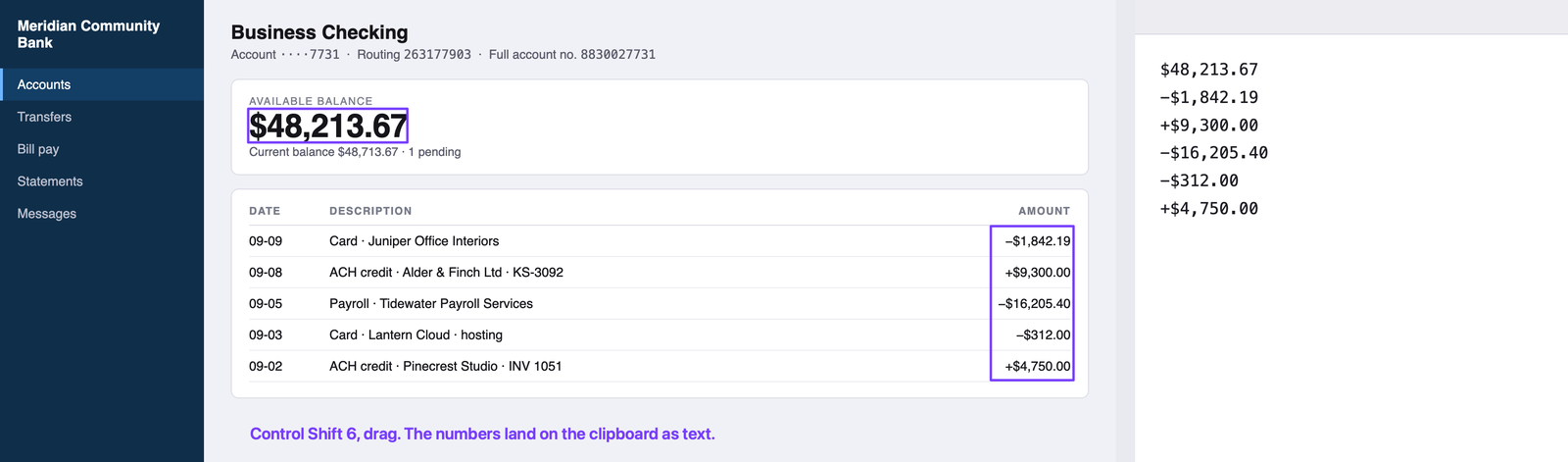
Text grab on a bank portal: box the figures, and they land on the clipboard as text. Right, the paste. Every number invented.
The tool I use is the one I built
When I switched to a Mac after twenty-two years on Windows, the first thing I went looking for was the Snipping Tool. When I couldn't find it, I built my own: Snippy Snip. Everything in habits one, two, and four (arrows, callouts, step balloons, blur) is free; recording, text extraction, full-page web capture, and pinned shots are Pro, $19 once, no subscription.
But hear me clearly: the habits are the point, not the tool. They work with whatever capture app you already have. If yours does the job, keep it.
Your turn
This week, pick one:
- Screenshot the model before your next structural edit.
- Send one reconciliation break as an annotated image instead of a paragraph.
- Record one close task while you do it, even five minutes of one.
- Blur one screenshot before it leaves your machine.
Then ask yourself the question I keep coming back to: how much of last week did you spend describing something you could have shown?
The free version is free forever. Pro is $19, once — no subscription.
Twenty years in finance and operations, exited founder, still closing the books monthly across his own businesses. Built Snippy Snip after 22 years on Windows. LinkedIn