Field guide
Snagit alternatives without a subscription
Snagit doesn't sell a one-time license anymore. If you went looking for the buy-once option and couldn't find it, you didn't miss it. It isn't there.
As of 2026-08-20, Snagit's store (TechSmith's) sells one thing: a subscription. $39 per user per year for Individual, $48 per user per year for Business at a ten-seat minimum, with a 15-day trial on either. There is no perpetual tier anywhere on that store, at any price.
That's a legitimate business decision, and Snagit is a good product with a long history behind it. But it changes the question you're standing in front of.
You're not picking a screenshot tool anymore. You're deciding whether a screenshot tool belongs on the list of things that bill you forever.
If your answer to that is no, here's the honest map.
One housekeeping note, because this is a pricing article and pricing articles rot. Every number below was read off the vendor's own checkout page on 2026-08-20. Software prices move. If you're reading this a long way past that date, click through and confirm before you pay, and if you find one that's changed, tell us at [email protected] and we'll fix the page.
"One-time purchase" and "never pay again" are two different promises
Here's the part most comparison pages leave out.
Several of the popular "one-time" Mac capture apps include one year of updates. After that year, you're offered a renewal. The app you already bought keeps working. It just stops getting new versions unless you pay again.
CleanShot X is $29 once, includes 1 GB of Cloud Basic storage, and comes with a year of updates. After that, renewal is $19 a year and it's optional. Skip it and the app keeps running exactly as it is. (Their separate Cloud Pro service is its own subscription: $8 per user per month billed annually, $10 monthly.)
Xnapper is $29.99 for one device on the same shape. One year of updates, optional renewal after. Two devices is $54.99, three is $79.99. Its free tier puts a watermark on your images.
Neither of those is a trick. Both companies print the terms on their own pricing pages, and funding continuous development with renewals is a normal, honest way to run a software business. Plenty of great software works this way.
But it is a different deal than the one you typed into the search bar. If "no subscription" means the price I pay is the price I pay, read the updates column before you read the price column.
The honest options, including the ones that beat us on price
| App | Price (USD) | What that buys | Updates |
|---|---|---|---|
| Snagit Individual | $39 per user / year | Subscription only. Account required, license not transferable. 15-day trial. | While you're subscribed |
| Snagit Business | $48 per user / year | Subscription, ten-seat minimum. Transferable license key. | While you're subscribed |
| CleanShot X | $29 once | One-time, plus 1 GB Cloud Basic. Cloud Pro is separate at $8/user/mo annually. | 1 year, then optional $19/yr. App keeps working unrenewed. |
| Shottr | Free, or $12 once | Free tier runs indefinitely and nags after 30 days. The $12 license is required for commercial use and covers 1 user on up to 5 Macs. $30 "Friends Club" adds experimental features. | Perpetual |
| Xnapper | $29.99 once (1 device) | Free tier watermarks your images. $54.99 for 2 devices, $79.99 for 3. | 1 year, then optional renewal |
| Setapp | $14.99 / month | Bundle subscription. Includes CleanShot X and Xnapper plus the rest of the catalog. 7-day trial. Mac + iOS is $18.99, Power User $22.99. | While you're subscribed |
| macOS built-in | $0 | Capture and recording, already installed. | With the OS |
| Snippy Snip | Free, or $19 once | Free tier: every capture mode and the full annotation editor. No watermark, no nag. Pro adds recording, text extraction, full-page web capture, pinned shots, timer. | Every update included, forever |
Shottr's checkout lists $12; their homepage currently carries different wording, so click through before you pay.
Two more, so the map is complete. Zight (formerly CloudApp) runs free, $9.95, or $12 per user per month, and Droplr is $8 a month or $72 a year. Both are cloud-first, both are subscriptions. If you got here searching for a one-time purchase, neither one is what you're looking for, and I'd rather tell you that than pad a table.
The row that should jump out at you is Shottr at $12. It's cheaper than we are, the license is perpetual, it covers five Macs, and it's a genuinely good app. That's not a grudging admission. It's the most likely right answer on this page for a lot of the people reading it.
Before you buy anything, check what your Mac already does
Hit ⌘⇧5.
You get a capture bar with six buttons: capture the whole screen, a window, or a selection, and record the whole screen, a selection, or a selected window. Behind Options you'll find where captures save (Desktop, Documents, Clipboard, Mail, Preview, QuickTime Player, or a folder you pick), a timer, the floating thumbnail toggle, show mouse pointer, show mouse clicks, microphone selection, and a capture format switch between SDR and HDR.
That's free, it's already installed, and for a lot of people it's the entire job.
Where it stops: there's no system-wide scrolling or full-page capture. Text extraction exists as Live Text, but it lives in Preview and the floating thumbnail, not inside the capture flow, so pulling text out of a shot is a separate errand. And by default every capture lands as a PNG on your Desktop, named for the date and time it was taken.
I wrote a full field guide on the built-ins, settings and all. Read that first. If it covers you, close this tab and keep your $12.
What $19 buys, and what "forever" means here
One payment. $19. Every update included, minor and major. No renewal year, no version-2 tax, no asterisk under the word "forever."
The free tier is not a demo. It's every capture mode plus the full annotation editor: arrows, highlights, blur, crop, text, numbered and lettered step balloons, and a session carousel so your captures stop littering your Desktop. No watermark. No nag screen. No countdown. If you never pay us a dollar, the app doesn't get worse.
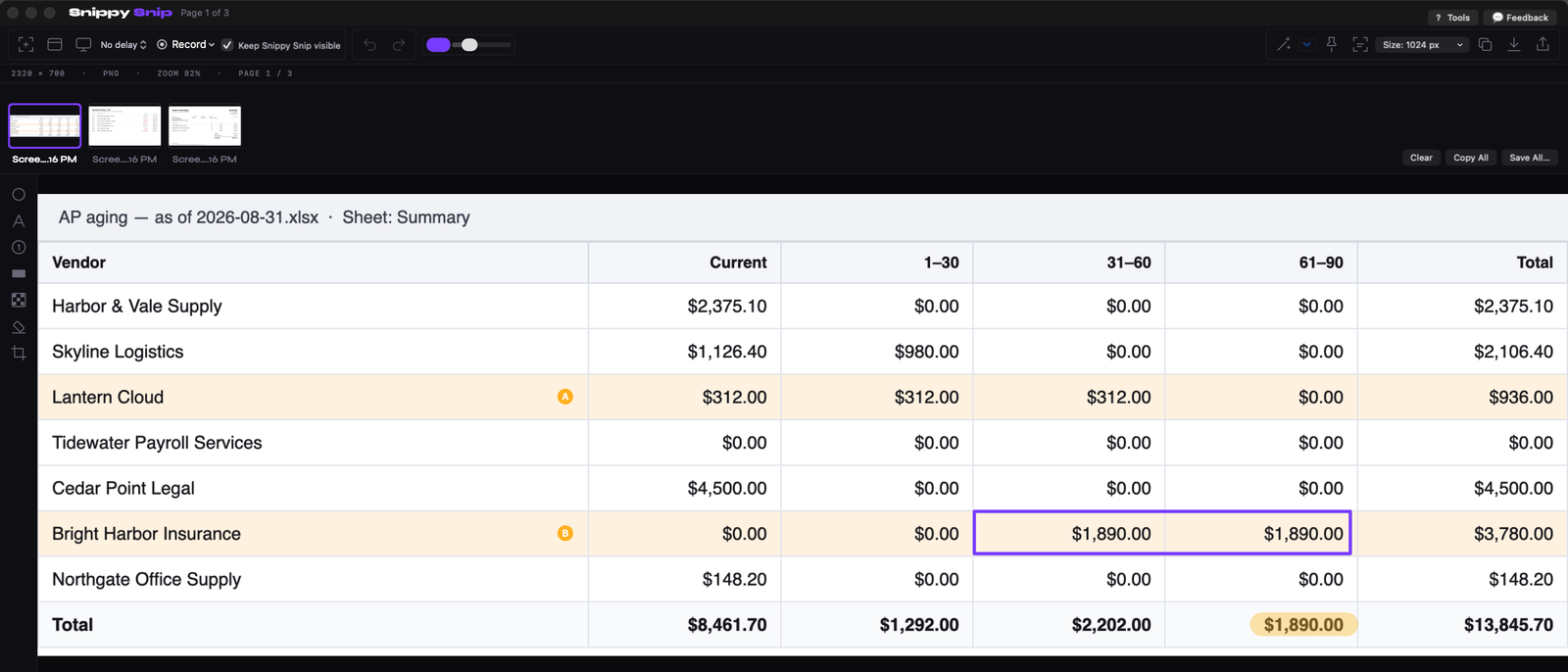
The free editor on an aging report: badges, a box, a highlighter mark, and the session carousel. Every number invented.
Pro adds the things I built for my own workday: screen recording with playback in the editor (your camera in the corner, pause and resume, and a GIF button for the takes that belong in an email), text extraction from any image, full-page website capture, pinned screenshots that float above your other windows, a backdrop you control, export sizes for AI chats, and a delay timer. One license covers three Macs. No account, no telemetry, and the app is 3.7 MB.
For teams there's a $250 one-time Organization license covering unlimited seats on your company's email domain. The table above has the per-seat-per-year numbers next to it. Do that arithmetic for your own headcount and your own time horizon, because the answer depends on both.
So which one should you actually buy
Real answers, not a funnel.
- Buy nothing yet if you haven't tried ⌘⇧5 properly. Capture, record, timer, save straight to the clipboard. Most people who think their Mac can't do this have never opened the Options menu.
- If $12 Shottr covers you, buy Shottr. Perpetual license, five Macs, no renewal. If your needs are capture and quick markup and you don't care about recording or OCR, it is the cheapest correct answer here and you should take it.
- If you want the cloud-sharing workflow and a yearly renewal doesn't bother you, CleanShot X. It's polished, it's well loved, and $19 a year for updates is a fair price for what it is. Just go in knowing it's there.
- If you already pay for Setapp, stop shopping. CleanShot X and Xnapper are both in the bundle. You've already bought them.
- If your team standardized on Snagit years ago, the switching cost is real. Templates, shared workflows, and habits across a whole department are worth more than $39 a head. Renew, and don't feel bad about it.
- If you want one payment, everything included, and never to think about it again, that's us. $19 once. Try the free tier first; it's the actual product, not a trailer for it.
The question underneath the question
$39 a year for a tool you use every day is not an outrageous price.
That's exactly what makes it sticky. Nothing at $39 a year ever gets canceled. It's too small to notice on the statement and too useful to cut on a Tuesday, so it just runs, sitting next to everything else that's too small to notice.
Plenty of software earns a recurring bill. A cloud service with servers to keep running, a product shipping meaningful work every month, a tool your revenue depends on. Those are easy yeses.
An app that puts a picture of your screen on your clipboard is not that.
So open your subscriptions list. Not to feel bad about it. Just to answer one question honestly: how many of those would you have happily paid for once?
Free forever, no watermark. Pro is $19, once.
Twenty years in finance and operations, exited founder, still closing the books monthly across his own businesses. Built Snippy Snip after 22 years on Windows. LinkedIn